On-Page SEO Checklist: 15 Checks for Every Page
A practical on-page SEO checklist for every page: intent, titles, headings, content, links, images and schema, with a fix-first order for small sites.
An on-page SEO checklist is a short list of things to check on each page so that search engines and visitors can tell what the page is about and why it deserves to rank. The essentials are one clear search intent per page, a unique title and meta description, a single descriptive H1 with logical subheadings, a clean URL, content that fully answers the query, descriptive internal links, images with alt text, and structured data where it applies. Below are 15 checks you can run on any page, the places to edit them in WordPress, Shopify and Wix, and the order to fix things in when your site has dozens of pages.
It is written for owners and marketers who edit their own site, with extra notes for Singapore service businesses that live or die by local searches.
In short
- On-page SEO is what you control on the page itself: intent, titles, headings, content, links, images and structured data. Technical SEO covers the site as a whole, such as crawling, speed and indexing.
- Google sets no length limit for titles or meta descriptions, but it truncates them to fit the screen. Keep titles concise and descriptions to a sentence or two.
- Google often rewrites titles and snippets when they are vague, stuffed or inaccurate, so write them for people.
- Word count, keyword density and heading order are not ranking rules. Usefulness, clarity and accuracy are what count.
- Start with the pages that already get impressions or bring enquiries, not the whole site at once.
What on-page SEO covers (and what belongs to technical SEO)
| Area | Examples | Who usually fixes it |
|---|---|---|
| On-page SEO | Search intent, title, meta description, headings, URL, content, internal links, images, structured data on the page | Content owner or marketer, in the CMS |
| Technical SEO | Indexing, sitemaps, robots.txt, redirects, site speed, mobile rendering, duplicate URLs | Developer or SEO specialist |
| Off-page SEO | Links from other sites, Google Business Profile, reviews, mentions | Marketing and the business owner |
The three overlap. A page with perfect on-page SEO will not rank if it cannot be indexed, and a fast site will not rank for searches its pages do not answer. This checklist covers the on-page part, which you can usually fix yourself.
Before you edit: confirm the search intent
Search the phrase you want the page to rank for, in an incognito window, and look at what already ranks. The results tell you what Google thinks searchers want:
- Service or product pages ranking means people want to buy or compare providers.
- Guides and articles mean people want to learn first.
- Maps and local listings mean location matters, so your Google Business Profile and local signals count.
- Prices or comparison tables in the results mean people expect costs on the page.
If your page is a sales page and the results are all guides, a better title will not fix the mismatch. Either write a guide that links to the sales page, or target a more commercial phrase.
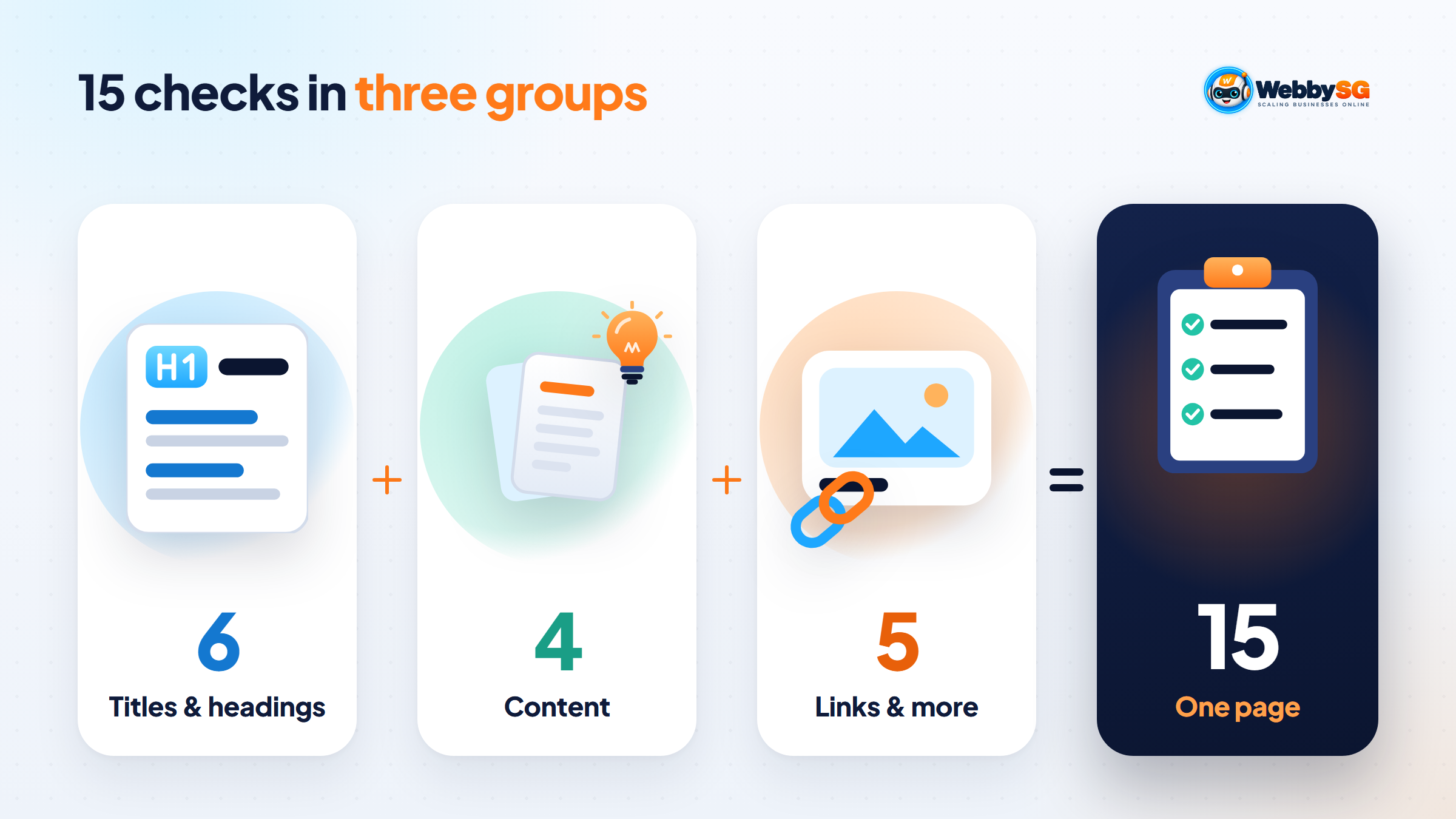
The on-page SEO checklist: 15 checks for every page
Titles, H1, headings and URL
- One primary topic per page. Decide the main phrase and its close variations. If two pages target the same phrase, merge them or give each a distinct angle.
- A unique, descriptive title tag. Put the main topic first and your brand at the end, separated by a pipe or hyphen. Google's title link guidance says there is no length limit, but long titles are truncated to fit the device, so concise titles (often around 50 to 60 characters) display best. Google may generate a different title if yours is vague, boilerplate, stuffed with keywords or inaccurate.
- A meta description that earns the click. Summarise what the page offers and why it is worth visiting, in a sentence or two. Google's snippet documentation says snippets are mainly created from page content, and the meta description is used when it describes the page more accurately. Write a different one for each page.
- One clear H1 that matches the title's topic, usually the visible page heading.
- Subheadings that outline the page. Use H2s for main sections and H3s inside them. Google's starter guide says heading order does not affect ranking, but a logical outline helps readers and screen reader users.
- A short, readable URL with words that describe the page, such as /services/aircon-servicing/ rather than /page?id=123. Do not change URLs of pages that already rank unless you set up a redirect.
Content and keyword use
- Answer the query early. The first paragraph should say what the page covers and give the short answer. This helps visitors, and it helps AI-generated summaries pick up your answer.
- Cover what searchers need to decide. Prices or price factors, process, timelines, who it is for, and common questions. Google's SEO starter guide says content length alone does not matter for ranking, so aim for complete, not long.
- Use the main phrase naturally. In the title, H1, first paragraph and where it fits, plus the words people actually use (synonyms, local terms). Repeating the same phrase over and over reads badly and can count as keyword stuffing.
- Show it is current and credible. Updated prices and facts, a named author or company, real photos and specific details that only your business would know.
Links, images and structured data
- Internal links in and out. Link from related pages to this page with descriptive anchor text (not "click here"), and link from this page to the next step, such as a service or contact page.
- External links where they help. Link to official sources for facts, rules or statistics you cite.
- Images with alt text and sensible file sizes. Describe what the image shows in a short phrase; leave purely decorative images with empty alt text. Compress images before uploading.
- Structured data where it applies. For example, LocalBusiness for your contact or location page, Product for product pages, Article for blog posts. Test with Google's Rich Results Test.
- A clear next step. Not a ranking factor in itself, but a page that ranks and converts nobody is not doing its job. One obvious call to action per page.
Structured data and local signals for service pages
Many Singapore SMEs win most of their enquiries from local searches such as "aircon servicing Tampines" or "accountant near Raffles Place". For those pages, add:
- Your business name, address and phone number, written the same way as on your Google Business Profile.
- The areas you serve, named in the text where it is true and useful, rather than a list of every estate in Singapore.
- Local proof: photos of real jobs, reviews and project examples you can stand behind.
- LocalBusiness structured data on your contact or location page. Google's local business documentation lists name and address as required, with telephone, opening hours and URL among the recommended properties.
- A separate page for each main service, so each can target its own searches.
Here is how the checklist changes a typical local service page. The business is an example, not a client, but the "before" column is the pattern we see most often on small Singapore sites:
| Field | Before | After |
|---|---|---|
| Title tag | Services | Brand Name | Aircon Servicing in Tampines and the East | Brand Name (54 characters) |
| Meta description | Empty, so Google pulls text from the footer | General servicing, chemical wash and gas top-up for homes in Tampines, Pasir Ris and Bedok, with prices on the page and online booking. |
| H1 | Our Services | Aircon servicing in Tampines |
| URL | /services-2/ | /aircon-servicing-tampines/, with a redirect from the old address |
| First paragraph | Company history since founding | What each service includes, areas covered, price range and how to book |
| Structured data | None | LocalBusiness on the contact page with name, address and telephone |
None of these changes takes more than an hour, and none needs a developer.
Our local SEO guide for Singapore covers Google Business Profile and reviews, which matter as much as the page itself.
Where to edit these fields in WordPress, Shopify and Wix
| Field | WordPress (with Yoast SEO or Rank Math) | Shopify | Wix |
|---|---|---|---|
| Title tag and meta description | The SEO plugin's panel below or beside the page editor | "Search engine listing" section at the bottom of each page, product or collection | SEO settings for each page ("SEO basics") |
| URL | Slug field in the page settings or the SEO plugin panel | URL handle in "Search engine listing" | URL slug in the page's SEO settings |
| H1 and subheadings | Heading blocks in the editor | Page or product title (H1 in most themes); headings in the description editor | Text element heading styles (check they are real heading tags) |
| Alt text | Image block settings or the media library | Product media or the media library | Image settings |
| Structured data | SEO plugin schema settings | Theme (products); apps or theme code for other types | Built-in for some page types; custom markup in SEO settings |
When you change a URL on any platform, make sure a redirect points the old address to the new one. Wix's help centre notes that a changed URL is treated as a new page by search engines, so its old rankings are lost without one. If you run WordPress, our WordPress website service page explains how we set sites up for easy editing.
What to fix first when you have many pages
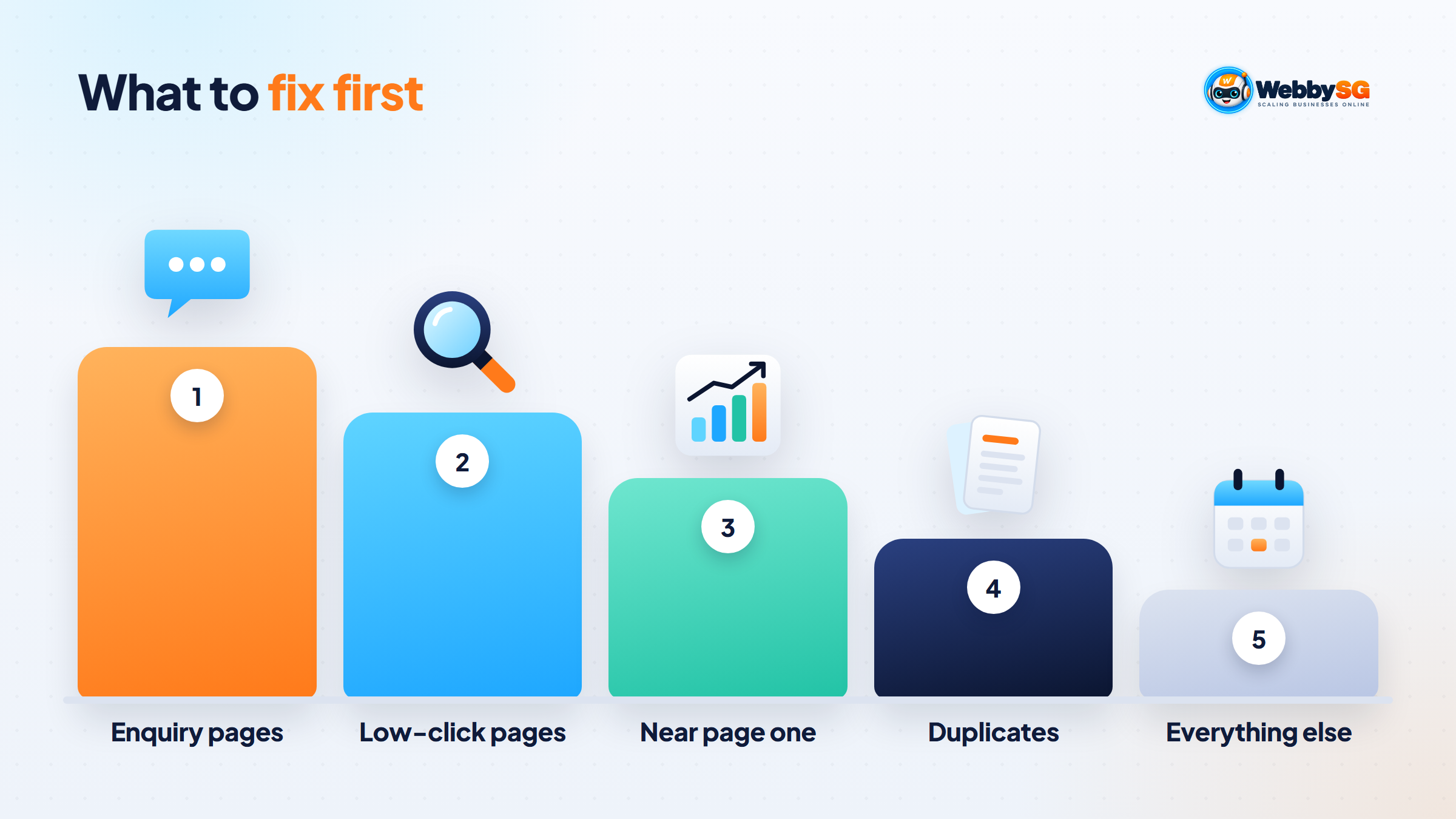
Do not try to rewrite 60 pages in one go. Work in this order:
- Pages that bring enquiries or sales. Your main service, product and contact pages.
- Pages with many impressions but few clicks in Google Search Console. These usually need better titles and meta descriptions, and are the quickest wins.
- Pages ranking just off page one for useful phrases. Improve content depth and internal links to them.
- Duplicate or overlapping pages. Merge them and redirect the weaker one.
- Everything else, during regular content reviews.
Record what you changed and when, then compare clicks and enquiries in Search Console and Google Analytics four to eight weeks later. If you are also trying to appear in AI-generated answers, our guide to answer engine optimisation explains what changes and what stays the same.
When to get help
On-page fixes are a good place for a small business to start on its own. Help is useful when pages are not indexed, the site has technical problems, or competitors outrank you with stronger content and links. Webby SG's SEO services cover on-page, technical and content work, and our overview of SEO packages in Singapore explains what is typically included. If you would like a second opinion on a few key pages, contact us.
Frequently asked questions
How long should a title tag be?
Google has no fixed limit, but it truncates title links to fit the device width. Titles of around 50 to 60 characters usually display in full on desktop, so put the most important words first. Unique, descriptive titles matter more than an exact character count.
Should every page have only one H1?
One H1 is the clearest structure and what most themes produce, so it is a sensible default. Google says there is no ideal number of headings and that heading order does not affect ranking. The H1 should clearly state the page's main topic.
Do meta descriptions affect rankings?
Not directly. Google mainly builds snippets from page content and uses your meta description when it describes the page more accurately. A good description can improve how many people click your result, which is why it is still worth writing one for each important page.
How often should I review on-page SEO?
Review your most important pages every few months, and whenever prices, services or facts change. Check Search Console monthly for pages whose impressions or clicks drop. New pages should go through the checklist before they are published.
Is on-page SEO enough to rank?
It is the foundation, but often not enough on its own for competitive searches. The site also needs to be crawlable and fast, and links from other reputable sites and a strong Google Business Profile help. For low-competition local searches, solid on-page work can be enough to make a noticeable difference.