Website Accessibility in Singapore: A Plain Guide for SMEs
What website accessibility rules apply in Singapore, why SMEs should care, and a free step-by-step way to test and fix the most common WCAG issues.
Website accessibility means building your site so that everyone can use it, including people who are blind or have low vision, people who cannot use a mouse, people with hearing loss and older users with weaker eyesight or less steady hands. For website accessibility in Singapore, the short answer on rules is this: government digital services follow GovTech's Digital Service Standards, which incorporate the Web Content Accessibility Guidelines (WCAG) at Levels A and AA, but there is no general law requiring private business websites to meet WCAG. The Government encourages private organisations to improve, and there are good commercial reasons to do it anyway.
This guide explains what applies, what WCAG asks for in plain English, the problems we see most often on SME websites, and a free way to test and fix your own site.
In short
- Government agencies in Singapore are expected to meet WCAG Levels A and AA through the Digital Service Standards. The Government plans to make all high-traffic government websites accessible by 2030.
- Private business websites are not under a general WCAG mandate, but the Government has said non-government entities should also improve accessibility.
- WCAG 2.2 is the current version, and W3C recommends using the latest version. Aim for Level AA.
- GovTech's Oobee is a free, open-source tool that scans your site against WCAG 2.2. Combine it with simple keyboard and zoom checks.
- Most fixes on a small business site are quick: alt text, colour contrast, form labels, headings and keyboard focus.
What "website accessibility" means
An accessible website works with the different ways people browse. Some use a screen reader that reads the page aloud. Some navigate with only a keyboard or a switch device. Some zoom text to 200% or more, turn on captions, or need more time to fill in a form. Others are simply using a phone in bright sunlight or holding a child in one arm.
Accessibility is not a separate "accessible version" of your site. It is a set of habits in design, content and code: text that contrasts with its background, images that have text alternatives, forms that say what each field is for, and buttons that work without a mouse.
Website accessibility in Singapore: government standards vs private businesses
The rules differ depending on who runs the site.
| Government digital services | Private business websites | |
|---|---|---|
| Standard | GovTech's Digital Service Standards, which incorporate WCAG Levels A and AA | No general legal standard; WCAG is the recognised reference |
| Who it covers | Government agencies and the industry partners who build their services | Not mandated, but encouraged |
| Target | All high-traffic government websites accessible by 2030 (Enabling Masterplan 2030) | None set |
| Support available | GovTech's central tools and usability checks | Free Oobee scanner and public guidance on WCAG |
The Digital Service Standards say they incorporate WCAG Levels A and AA, and that government agencies and their industry partners are expected to apply them. In a parliamentary reply in November 2024, the Ministry of Digital Development and Information confirmed the plan to make all high-traffic government websites accessible by 2030, and said non-government entities should also improve the accessibility of their digital services. It pointed them to GovTech's free testing tool rather than setting a requirement.
Two practical points for SMEs. First, if you build or supply digital services for a government agency, expect accessibility requirements in the contract. Second, the absence of a law is not the same as the absence of risk: customers who cannot use your site simply go elsewhere. This is general information, not legal advice.
Why SMEs should care even without a mandate
- An ageing customer base. Singapore's population is ageing, and many older customers have weaker eyesight and less precise finger control. Small grey text and tiny buttons lose them.
- More enquiries and sales. Accessibility problems are usability problems. A form that a screen reader cannot use is usually confusing for everyone.
- Tenders and corporate clients. Government and larger organisations increasingly ask suppliers about accessibility.
- Search visibility. Clear headings, descriptive links and alt text help search engines understand your pages too.
- It is cheaper to build in than to fix later. Getting colours, fonts and form patterns right during a redesign costs little. Retrofitting them across a finished site costs more.
WCAG in plain English: the four principles
The W3C's WCAG overview lists the current version as WCAG 2.2, published in October 2023 and updated in December 2024. Its success criteria sit under four principles and three levels: A (minimum), AA (the usual target) and AAA (the highest). Content that meets WCAG 2.2 also meets 2.1 and 2.0.
| Principle | What it means | Examples on an SME site |
|---|---|---|
| Perceivable | People can see or hear the content in some form | Alt text on images, captions on videos, enough colour contrast |
| Operable | People can use every control | Menus and forms work with a keyboard, visible focus, tap targets large enough |
| Understandable | Content and behaviour make sense | Plain language, clear form labels and error messages, consistent navigation |
| Robust | It works with browsers and assistive technology | Proper HTML for buttons, links and headings rather than styled boxes |
WCAG 2.2 added nine success criteria. The ones most relevant to small business sites are Target Size (Minimum) at Level AA, which asks for clickable targets of at least 24 by 24 CSS pixels with some exceptions, Focus Not Obscured, so sticky headers or chat widgets do not hide the element a keyboard user is on, and Redundant Entry, so people are not asked to type the same information twice in one process.
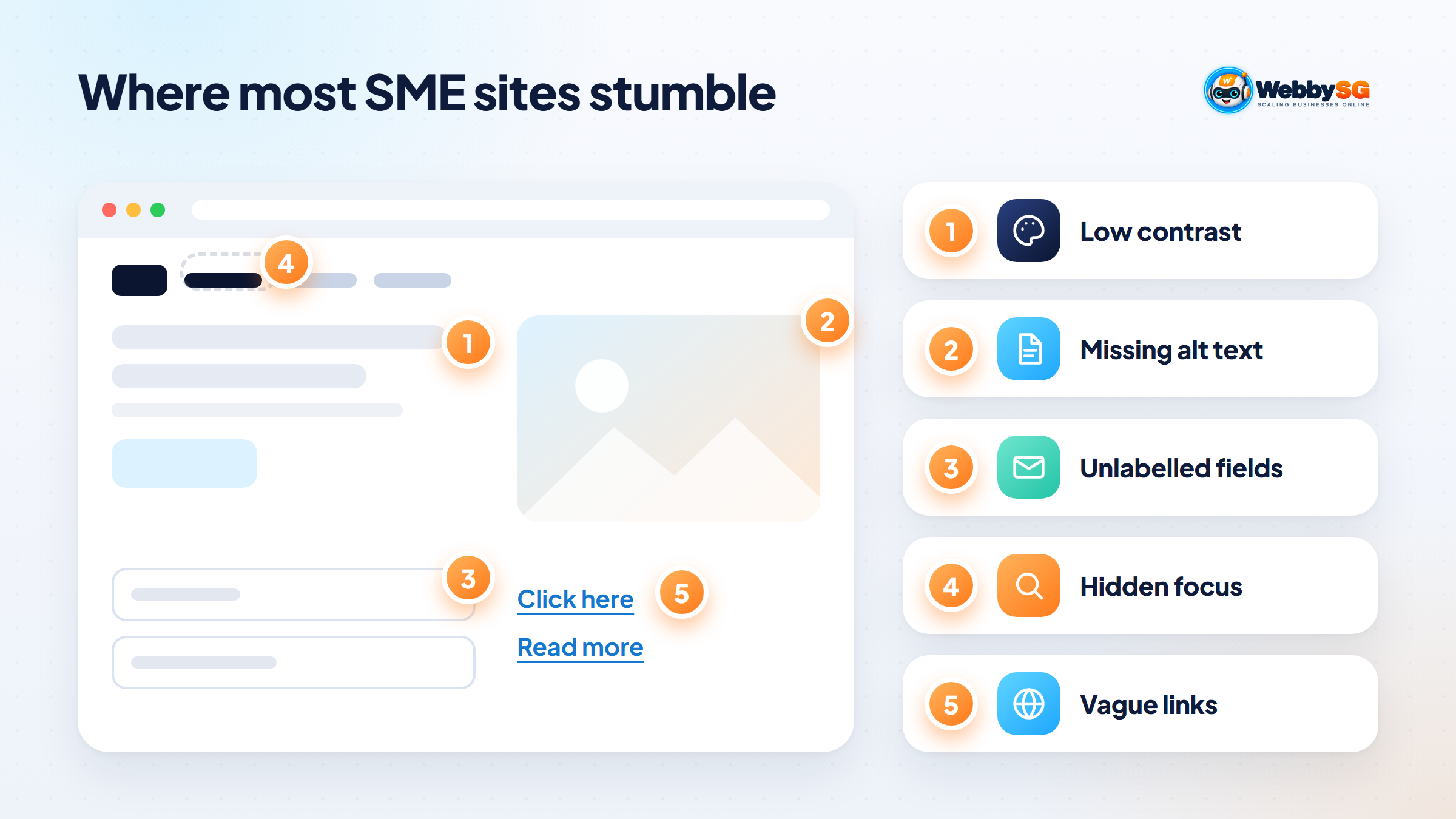
The most common issues on SME websites
These come up again and again on small business sites:
- Low colour contrast. Light grey text on white, or white text on a pale brand colour. WCAG AA asks for a contrast ratio of at least 4.5:1 for normal text and 3:1 for large text.
- Missing or useless alt text. Images with no alt text, or alt text such as "image1.jpg".
- Forms without labels. Grey hint text inside the field ("Name") that disappears when you type, and no real label for screen readers.
- No visible keyboard focus. The outline around the selected link has been removed for looks, so keyboard users cannot tell where they are.
- Headings used for styling. Text made into a heading because it looks big, so the page structure makes no sense to a screen reader.
- Vague links. Several "Click here" or "Read more" links that make no sense out of context.
- Pop-ups and chat widgets that trap focus or cover the content, especially on mobile.
- Text inside images. Promotions or prices shown only as part of a banner image.
How to test your site for free
An automated scanner only finds part of the problem. It can tell you an image has no alt text, but not whether the alt text it does have makes sense. So pair the scan with a few quick manual checks.
1. Scan with Oobee
Oobee (formerly Purple A11y) is GovTech's free, open-source accessibility testing tool. It can scan a website, a sitemap or a custom user flow, and rates the issues it finds as "Must Fix" or "Good to Fix" against WCAG 2.2. There is a desktop app for non-developers and a command-line version for developers. Start with your home page, a key service or product page, and your contact form.
2. Try the keyboard test
Put your mouse aside. Press Tab to move through the page and Enter to activate links and buttons. Check that you can reach the menu, every link and every form field, that you can always see where you are, and that you can close any pop-up.
3. Zoom to 200%
Zoom your browser to 200% on a desktop. Text should get bigger without overlapping or disappearing, and you should not need to scroll sideways to read paragraphs.
4. Check contrast and images
Use a free contrast checker on your main text and button colours. Then go through your key pages and check that every meaningful image has alt text that describes it, and decorative images are marked so screen readers skip them.
5. Listen to one page
Turn on the screen reader built into your phone or computer (VoiceOver on Apple devices, TalkBack on Android, Narrator on Windows) and listen to your contact page. If you cannot tell which field is which, neither can your customers who rely on it.
A prioritised fix list and accessibility statement
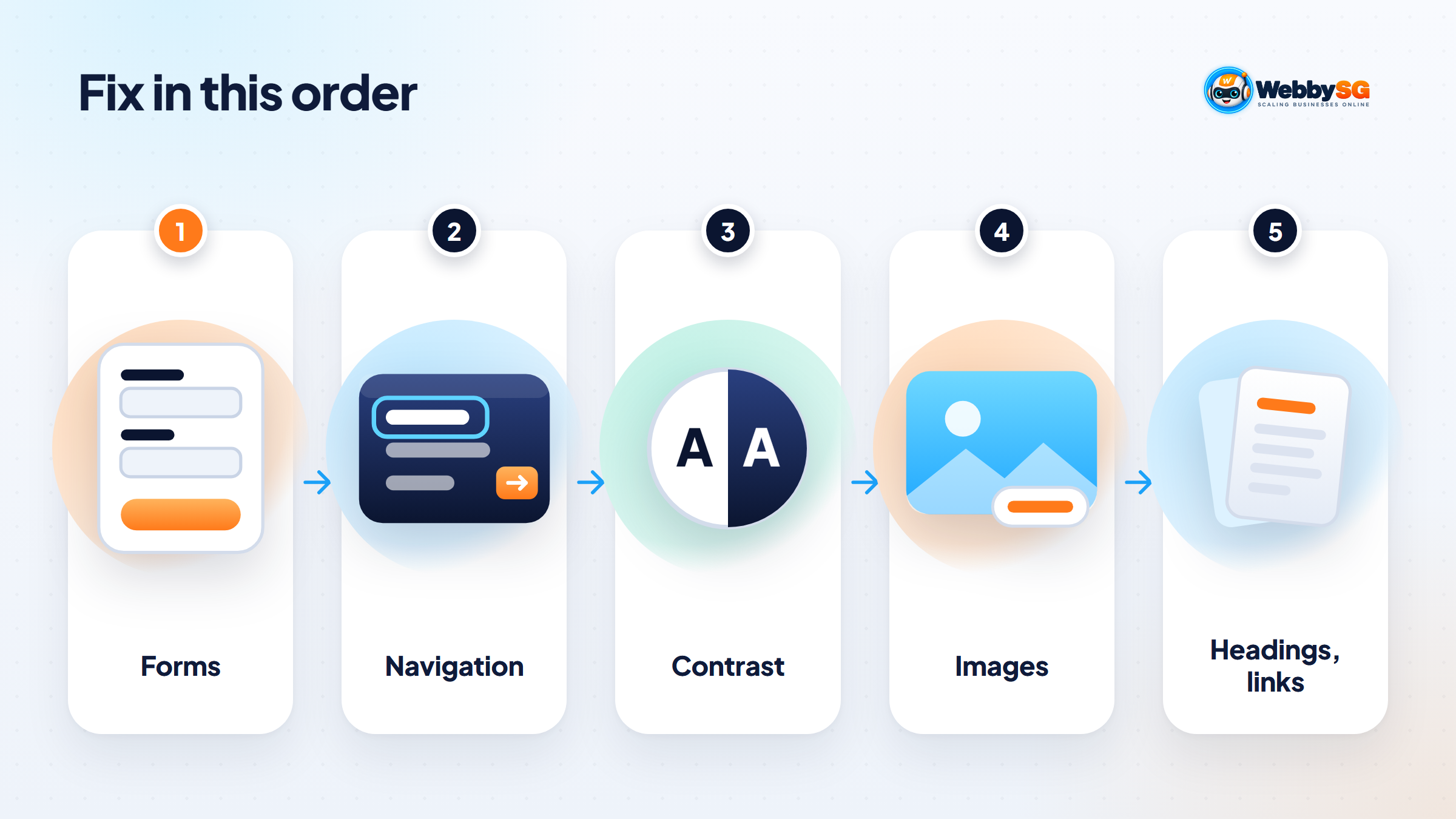
Fix in this order, so the work that helps the most people comes first:
- Contact and checkout forms: labels, clear error messages, keyboard access. These are where enquiries and sales happen.
- Navigation: keyboard-accessible menus, visible focus, a working mobile menu.
- Colour contrast on body text, buttons and links.
- Images: alt text on meaningful images, and real text instead of text baked into banners.
- Headings and links: one clear H1, logical H2 and H3 structure, and descriptive link text.
- Video and audio: captions, and transcripts for longer clips.
- Tap targets on mobile: buttons and links at least 24 by 24 CSS pixels, with space between them.
To make that concrete, take a hypothetical tuition centre whose Oobee scan flags its enquiry form. The fields use grey hint text instead of labels, the "Submit" button is pale blue on white, and the class-level dropdown cannot be opened with the keyboard. Fixing those three things is usually a small job for whoever maintains the site, and it helps every parent filling in the form on a phone, not just screen reader users.
Once the main fixes are done, publish a short accessibility statement. Say which standard you aim for (for example WCAG 2.2 Level AA), what you have tested, any known issues you are still working on, and how people can contact you if something does not work for them. Keep it honest: "we aim for" is better than claiming full compliance you have not verified.
A note on accessibility overlays: plug-ins that add a toolbar or claim to make a site compliant automatically do not fix underlying problems such as missing form labels or poor heading structure. They can be a useful extra, but they are not a substitute for fixing the site itself.
Accessibility and SEO: where they overlap
Many accessibility fixes also help search engines and AI tools understand your pages:
- Headings give both screen readers and search engines a clear outline of the page.
- Alt text describes images for screen reader users and for image search.
- Descriptive link text tells users and crawlers what the linked page is about.
- Captions and transcripts turn video content into text that can be indexed.
- Clean, semantic HTML is easier for any software to read.
Accessibility is not a ranking shortcut, but an accessible site is usually a better-structured site, and that supports your SEO work.
Getting help with an accessible website
If you are planning a new site or a redesign, it is the best time to build accessibility in. Our web design service covers accessible colours, typography, forms and navigation from the start, and our guide to a website UX audit explains how to review an existing site more broadly. For ongoing fixes after launch, see our website maintenance service. If you would like us to look at your site, get in touch.
Frequently asked questions
Is WCAG compliance mandatory in Singapore?
Not for private businesses in general. Government digital services follow GovTech's Digital Service Standards, which incorporate WCAG Levels A and AA, and the Government aims to make all high-traffic government websites accessible by 2030. Private organisations are encouraged to improve accessibility but are not under a general legal requirement. If you supply digital services to a government agency, check your contract for accessibility terms.
Is WCAG 2.2 or 2.1 the standard to follow?
Follow WCAG 2.2, which is the current version, and aim for Level AA. W3C recommends using the latest version, and content that meets WCAG 2.2 also meets 2.1. GovTech's Oobee tool also checks against WCAG 2.2.
Can an accessibility plugin or overlay make my site compliant?
No. Overlays can add options such as larger text or higher contrast, but they do not fix the underlying code, such as missing form labels, broken keyboard access or confusing heading structure. Treat them as an optional extra and fix the site itself.
How long does an accessibility fix take?
For a typical small business site, the common fixes such as contrast, alt text, form labels and focus styles can often be done in days rather than weeks. Sites with custom components, complex forms or online stores take longer. Running a scan and a keyboard test first will show you how much work there is.
Does accessibility improve SEO?
Indirectly, yes. Good headings, alt text, descriptive links and clean HTML help search engines understand your content, and they help users stay and act on the page. Accessibility work is not a shortcut to higher rankings, but the two goals overlap heavily.