Payment Gateway Singapore: How SMEs Should Choose
Compare Singapore payment gateways by platform, PayNow support, real fees and payout times, with a simple way for SMEs to pick the right one.
A payment gateway is the service that takes a customer's card, PayNow or wallet payment on your website and passes it safely to the bank, then pays the money out to your business account. For an SME, choosing a payment gateway in Singapore comes down to four questions: does it work with the platform your store already runs on, does it offer the methods your customers expect (cards and PayNow at minimum), what does it really cost once every fee is added, and is the provider licensed by the Monetary Authority of Singapore (MAS)? The cheapest headline rate is rarely the cheapest option overall.
This guide starts from your store platform rather than from any one provider, compares the published fees of the main options on a worked S$ example, and shows how to check a provider's MAS licence before you sign up.
In short
- Pick a gateway that plugs into your platform natively. Shopify, WooCommerce and Wix each support a different set of providers in Singapore.
- Offer cards and PayNow. PayNow is usually far cheaper per order than cards, and PayNow payments cannot be charged back the way card payments can.
- Compare the total cost: transaction fee, foreign-card and currency conversion surcharges, dispute fees, payout timing and, on Shopify, the extra fee for third-party gateways.
- Check the provider on the MAS Financial Institutions Directory. Stripe, HitPay, PayPal and Airwallex all appear there as Major Payment Institutions (checked November 2026).
- Run real test orders and one refund before launch.
What a payment gateway does (and what it does not)
When a customer clicks "Pay", the gateway collects the payment details securely, sends them for authorisation and tells your store whether the payment succeeded. Most providers SMEs use today, such as Stripe, HitPay and Airwallex, bundle the gateway with payment processing and the merchant account, so you sign up once and receive payouts to your Singapore bank account.
A gateway does not:
- Build your checkout. Your platform (Shopify, WooCommerce, Wix) controls the cart, shipping and tax. The gateway only handles the payment step.
- Handle GST for you. If you are GST-registered, you charge 9% through your store settings; the gateway simply collects the total.
- Win disputes for you. If a cardholder disputes a charge, you still need order records, delivery proof and clear refund terms.
- Replace your accounting. Payouts arrive as batches net of fees, so you need to reconcile them against orders.
Payment methods Singapore customers expect at checkout
Most Singapore online shoppers expect at least these options:
- Credit and debit cards (Visa and Mastercard as standard, with Amex often requested).
- PayNow, Singapore's instant transfer service run through banks and major payment institutions. According to the Association of Banks in Singapore, businesses can receive PayNow to their UEN, and PayNow QR is integrated with SGQR, so customers scan and pay from their bank app.
- Wallets such as Apple Pay, Google Pay and GrabPay.
- Buy now, pay later, such as Atome, for higher-value items.
PayNow behaves differently on a phone than on a computer, which matters if many of your shoppers buy on their phones. Stripe's documentation describes the flow: on a desktop, the customer scans the QR code with their phone. On mobile, they save the QR image, open their banking app and upload it. The QR code expires after one hour. Make the instructions on that screen short and clear, and test the flow on both iPhone and Android before launch.
A note on India's UPI, which comes up often in searches: the PayNow–UPI linkage is for transfers between individuals across the two countries. It is not a way for Indian shoppers to pay a Singapore online store at checkout, so do not plan your checkout around it.
Which gateways work with Shopify, WooCommerce and Wix
Start from the platform you already use. Switching platforms to get a particular gateway rarely makes sense.
| Platform | Built-in option | Common Singapore add-ons | Watch out for |
|---|---|---|---|
| Shopify | Shopify Payments (cards, wallets, GrabPay for eligible stores) | HitPay and other providers through Shopify apps, mainly to add PayNow | Shopify charges an extra transaction fee on third-party gateway orders: 2% on Basic, 1% on Grow, 0.6% on Advanced |
| WooCommerce | WooPayments (Singapore is a supported country) | Stripe, HitPay and other plugins | You maintain the plugins; keep them updated and test after each update |
| Wix | No single default; you connect a provider | Wix lists PayPal, Stripe, HitPay, Atome and others for Singapore | Wix allows only one provider at a time for card payments |
On Shopify, the third-party fee changes the maths. Shopify's Singapore pricing page shows that fee on top of whatever the external provider charges. Shopify's help centre also notes that PayPal orders are exempt from the third-party fee when Shopify Payments is your main provider. Many Singapore stores therefore keep Shopify Payments for cards and add a provider only for PayNow, accepting the extra fee on those orders. Our Shopify store design service covers this set-up.
On WordPress, WooCommerce stores have the widest choice, because almost every provider publishes a plugin and there is no platform transaction fee. On Wix, check the list of providers in your dashboard before you commit, since availability varies by country.
Comparing the main options: Stripe, HitPay, PayPal, Airwallex and others
The table below uses each provider's own Singapore pricing page, as of November 2026. Percentages apply to the order value; fixed fees are in SGD. Rates can change, and some providers offer custom pricing at higher volumes.
| Provider | Local cards | International cards | PayNow (online) | Other published fees |
|---|---|---|---|---|
| Shopify Payments (Basic plan) | 3.2% + S$0.50 | Check Shopify's rates page | Not offered; add a provider | No third-party fee when used |
| Stripe | 3.4% + S$0.50 | +0.5% | 1.3% | +2% currency conversion; S$15 per dispute |
| HitPay | 2.8% + S$0.50 | 3.65% + S$0.50 | 0.9% (min S$0.20) under S$100; 0.65% + S$0.30 from S$100 | +2% on foreign-currency card payments; no monthly fee |
| Airwallex | 3.30% + S$0.50 | 3.60% + S$0.50 | Check fee schedule | Monthly plans from free (Explore) upwards |
| PayPal | Varies by transaction type and currency; check PayPal's Singapore merchant fees page | Familiar to overseas buyers | ||
Sources: Stripe Singapore pricing, HitPay pricing, Airwallex Singapore pricing and Shopify Singapore pricing, all checked 14 November 2026. Other providers you will see in Singapore include 2C2P, Adyen, Omise and Fomo Pay, which are generally aimed at larger merchants or specific integrations.
The real cost: transaction, FX, payout and chargeback fees
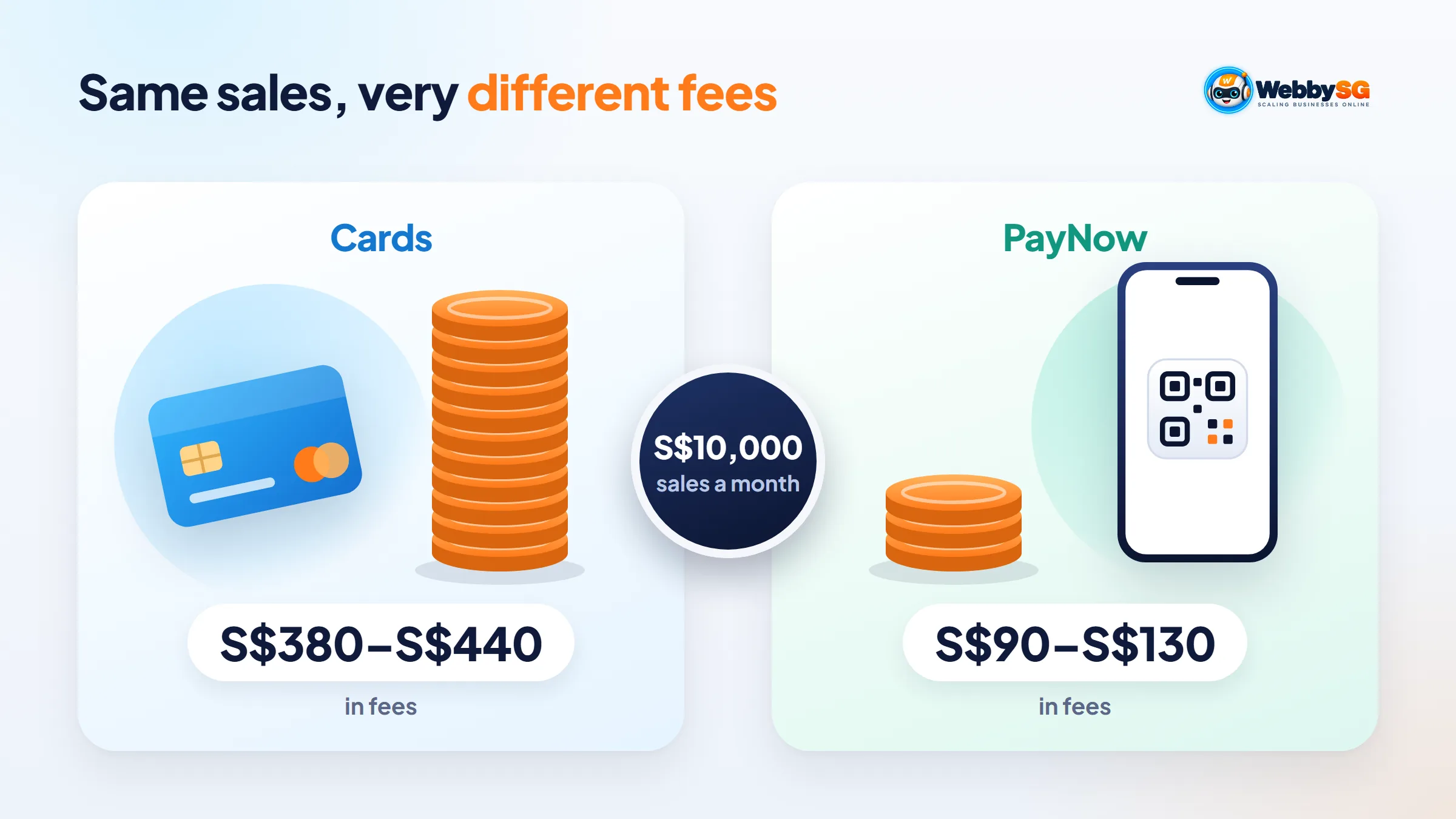
Here is a worked example using the published rates above: a store with 200 orders of S$50 in a month, S$10,000 in sales.
- All paid by local card. HitPay: 2.8% of S$10,000 plus 200 × S$0.50 = S$380. Shopify Payments on Basic: S$420. Airwallex: S$430. Stripe: S$440.
- All paid by PayNow. HitPay: 0.9% of each S$50 order is S$0.45, so S$90. Stripe: 1.3% of S$10,000 = S$130.
- PayNow through HitPay on a Shopify Basic store. Add Shopify's 2% third-party fee: S$200 on S$10,000, for S$290 in total. On Shopify, PayNow through a third-party provider can still cost less than cards, but the gap narrows.
Then add the costs that headline rates leave out:
- Foreign cards and currency conversion. Stripe adds 0.5% for international cards and 2% where currency conversion is needed. HitPay charges a separate international card rate and adds 2% for foreign-currency card payments. If many of your buyers are overseas, these can outweigh the local rate.
- Disputes. Stripe charges S$15 for each card dispute received. Stripe's documentation states that PayNow payments cannot be disputed through the standard chargeback process, which is one more reason to promote PayNow for local orders.
- Payout timing. HitPay states that card payments pay out from T+1 business day and PayNow reaches your HitPay balance on T+1 calendar day. Stripe's documentation lists a 7-calendar-day settlement timing for Singapore accounts, with PayNow funds available in your Stripe balance one day after payment. Your first payout with any provider can take longer while your account is reviewed.
- Platform fees and plans. Shopify's third-party fee, or a monthly plan at providers that offer paid tiers.
How to check a provider is licensed by MAS
Payment services in Singapore are regulated under the Payment Services Act, which sets out three licence classes: money-changing licensee, Standard Payment Institution and Major Payment Institution. Before handing your customers' payments to a provider, check its licence yourself:
- Open the MAS Financial Institutions Directory.
- Filter by the Payments sector, or search the provider's legal entity name (for example "Stripe Payments Singapore Pte. Ltd.", not just "Stripe").
- Confirm the licence type and that the entity name matches the one in the provider's terms of service.
- Check which payment services the licence covers, listed on the entity's directory page.
When we checked in November 2026, Stripe Payments Singapore, HitPay Payment Solutions, PayPal Pte. Ltd. and Airwallex (Singapore) were all listed as Major Payment Institutions, as were 2C2P, Adyen Singapore, Omise Payment SG and Fomo Pay. If a provider you are considering does not appear, ask which licensed entity processes your payments.
Which payment gateway in Singapore fits which kind of business
| Business type | What matters most | Sensible starting point |
|---|---|---|
| Local retail on Shopify | Low admin, cards plus PayNow | Shopify Payments for cards; add a PayNow provider if customers ask for it, after checking the third-party fee |
| Local retail on WooCommerce or Wix | Low local fees, PayNow | A local provider with PayNow and a native plugin, such as HitPay, or Stripe if you also need its wider tools |
| B2B and invoices | Payment links, PayNow to UEN, reconciliation | A provider with invoicing and payment links; PayNow keeps large invoice fees low (Stripe accepts single PayNow payments up to S$200,000) |
| Cross-border sales | Multi-currency pricing, FX costs | Compare international card and conversion fees; Stripe, Airwallex and PayPal are common choices |
| Subscriptions and memberships | Recurring card billing | A provider with mature recurring billing, such as Stripe; PayNow does not support automatic recurring charges on Stripe |
If you are still choosing a platform, read our guide to web hosting in Singapore alongside this one: hosted platforms such as Shopify and Wix bundle hosting, while WooCommerce needs its own.
Setting up and testing your gateway before launch
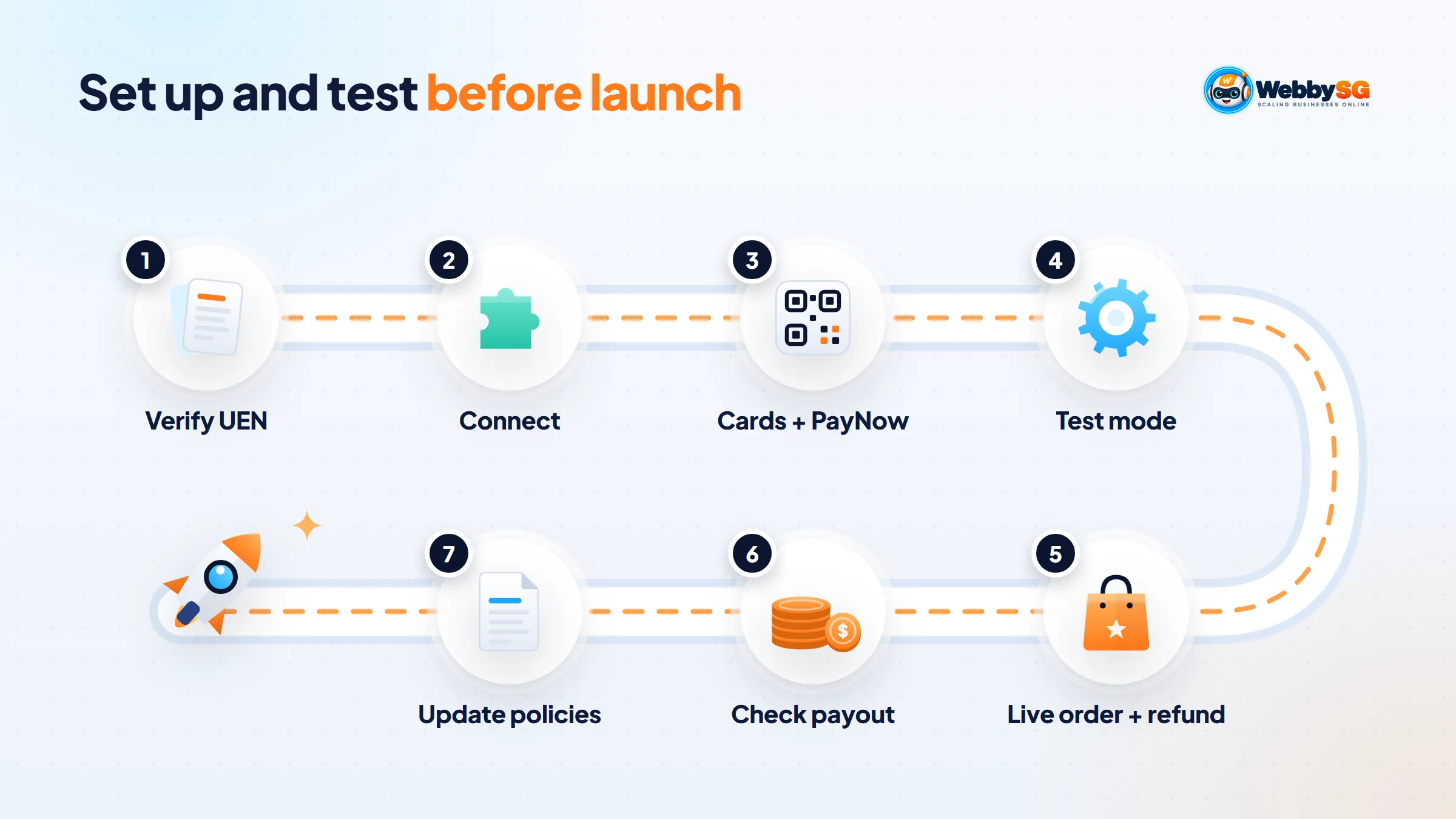
- Prepare verification documents. Providers verify you against ACRA records using your UEN. Have your business profile, directors' and owners' IDs and a business bank account in the company's name ready.
- Connect the provider through your platform's official app, plugin or payments settings, not a copied code snippet.
- Turn on the methods you want: cards, PayNow, wallets. Set the statement name customers will recognise, where the provider allows it. Stripe, for example, does not support custom names for PayNow, so customers see Stripe's own entity name in their banking app; say so on the payment screen to avoid confused emails.
- Use test mode to place successful and declined test orders.
- Go live with a small real order for each method, on mobile and desktop, then refund one of them end to end.
- Check the payout lands in your bank account and that you can match it to orders and fees.
- Update your policies. Your refund policy, and your privacy policy under the PDPA, should name the payment provider that receives customer data.
Choosing and wiring up payments is one part of building a store that sells. Our e-commerce website service covers platform choice, checkout set-up and testing on Shopify, WooCommerce and Wix. If you would like a second opinion on which gateway suits your store, send us a message.
Frequently asked questions
Which payment gateway is cheapest in Singapore?
It depends on how your customers pay. On published rates as of November 2026, PayNow is much cheaper than cards: HitPay charges 0.9% on PayNow orders under S$100 and Stripe 1.3%, against roughly 2.8% to 3.4% plus S$0.50 for local cards. On Shopify, remember the extra third-party transaction fee when you use a provider other than Shopify Payments.
Can I accept PayNow on my website?
Yes. Providers such as Stripe and HitPay generate a PayNow QR code at checkout, and the order is confirmed automatically once the customer pays. On Shopify, PayNow normally comes through a third-party provider's app rather than Shopify Payments. You can also show your UEN or a static QR code and confirm transfers manually, though that does not scale well.
Does Shopify charge extra if I use a third-party payment gateway?
Yes. As of November 2026, Shopify's Singapore pricing page lists a third-party transaction fee of 2% on Basic, 1% on Grow, 0.6% on Advanced and 0.2% on Plus, charged on top of the provider's own fees. Shopify Payments carries no third-party fee, and PayPal orders are exempt when Shopify Payments is your main provider.
How long does it take to get approved for a payment gateway?
Providers do not publish a single standard approval time. It depends on your business type, documents and risk review. Verifying with your UEN, through Corppass where offered, usually speeds things up. Stripe says first payouts are typically scheduled within 7 to 14 days of your first live payment, so allow at least two weeks before launch.
Do I need a registered business to use Stripe or HitPay in Singapore?
Both verify Singapore businesses against ACRA records using the UEN, and HitPay's Singapore onboarding requirements are written for ACRA-registered entities. Registering a sole proprietorship or company first is the simplest route. If you are not yet registered, ask the provider directly what it accepts and which features are limited.