What Is Web Design? A Guide for Singapore Businesses
Web design explained for Singapore businesses: what it includes, how it differs from development, what good design looks like, costs, PDPA and EDGE grant tips.

What is web design? It is the work of planning how a website is organised, how it looks and how people use it. It covers page layout, navigation, visual style, content structure, and how the site adapts to phones, tablets and desktops. For a business website, good web design has one practical job: help the right visitor understand what you offer, trust you enough to act, and see the next step clearly, whether that is a WhatsApp message, a phone call, an enquiry form or a purchase.
This guide explains what web design (often called website design) includes, how it differs from web development, what "good" looks like in terms you can check, and what Singapore businesses should plan for before commissioning a site.
In short
- Web design decides a website's structure, appearance and usability. Web development turns that design into a working site.
- Good design can be checked: a clear message within the first 10 seconds, a phone-first layout, fast loading, readable text and one obvious next step.
- In Singapore, also plan for PDPA-compliant forms, local search visibility and WhatsApp contact. If you are counting on a grant, note that PSG was replaced by the EDGE Grant on 30 September 2026.
- Cost depends mainly on page count, custom functions, content and ongoing hosting and maintenance, not on the visual design alone.
What web design includes
Many people equate web design with how a site looks. Visual style is only one layer. A well-designed business website is the result of several connected decisions:
| Part | What it decides | What goes wrong without it |
|---|---|---|
| Information architecture | Which pages exist, how they are grouped and what goes in the menu | Visitors cannot find services or prices; similar pages compete with each other in search |
| User experience (UX) design | The path a visitor takes from arriving to enquiring or buying | Dead ends, too many steps, forms people abandon |
| User interface (UI) design | Buttons, menus, forms and icons, and how they behave | Unclear buttons, tap targets too small for a thumb, confusing forms |
| Visual design | Colour, typography, spacing, imagery and brand consistency | A site that looks dated or untrustworthy, or is hard to read |
| Content design | Headings, page copy and the order information appears in | Pages that describe the company but never answer the customer's question |
| Responsive design | How layouts adapt to different screen sizes | A desktop site squeezed onto a phone |
| Accessibility | Whether people with visual, motor or cognitive impairments can use the site | Low-contrast text, images without descriptions, forms that cannot be completed by keyboard |
| Performance | How quickly pages load and respond (shared with development) | Visitors leave before the page appears |
| Search-readiness | Page structure, headings and metadata that search engines and AI tools can interpret | A good-looking site that does not appear for the searches that matter |
Not every project needs the same depth in each area. A one-page landing page for an ad campaign needs a sharp message and a short form. A 30-page corporate site needs careful information architecture. An online store needs product, cart and checkout design. Skipping a layer entirely, though, usually shows up later as lost enquiries.
Web design vs web development, UX and SEO
These terms overlap, and providers use them loosely. This is how they generally divide:
| Term | Focus | Typical output |
|---|---|---|
| Web design | Structure, appearance and usability | Sitemap, wireframes, page designs |
| Web development | Building the working site | Code, CMS setup, integrations, hosting configuration |
| UX design | Research and the visitor's journey | User flows, prototypes, usability findings |
| UI design | The interface elements themselves | Component designs and their states (hover, error, disabled) |
| SEO | Visibility in search results | Keyword targeting, technical fixes, content and links |
On small business projects, one team often handles design and development together, especially on platforms such as WordPress, Shopify or Wix. On larger or custom projects, they are usually separate roles. If a quote says "web design", check whether it includes the build, content entry and analytics setup, or only the design files.
For more on the build side, see our guide to custom web development and our UI/UX design guide.
What good web design looks like: six checks you can apply
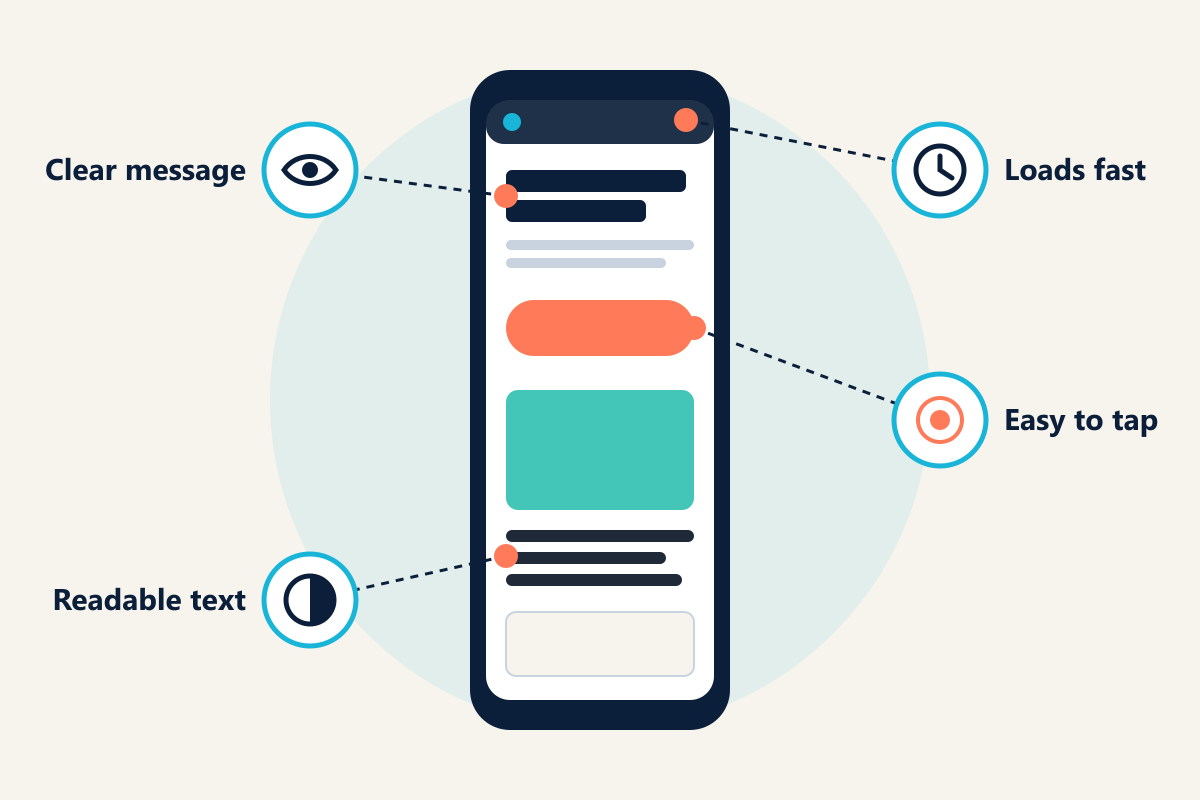
Design is partly a matter of taste, but most of what makes a business website work can be checked without a designer's eye.
1. A visitor understands what you do within 10 seconds
Usability research summarised by the Nielsen Norman Group found that users often leave web pages within 10 to 20 seconds, and that a page needs to communicate its value proposition within about 10 seconds to earn longer attention.
A simple test: show your homepage to someone outside your company for five seconds, then ask what you sell, who it is for and what they would click next. If they cannot answer, the problem is usually the headline and layout, not the colours.
A clear headline names the service and the customer. "Office cleaning for Singapore businesses, from one-off deep cleans to daily contracts" does more work than "Excellence in every detail".
2. It is designed for phones first
Google uses the mobile version of a site's content for indexing and ranking. Singapore also had 9.79 million active cellular mobile connections in late 2025, equal to 166% of the population, according to DataReportal. Check your own split between phone and desktop visitors in Google Analytics, but plan on the mobile layout being the one that matters most.
Designing for phones first means more than shrinking the desktop layout:
- The main message and call to action appear without scrolling.
- Buttons and links are large enough to tap with a thumb.
- Phone numbers and WhatsApp links work with a single tap.
- Forms ask only for what you need, with the right keyboard for each field (numbers for phone, email layout for email).
3. Pages load quickly
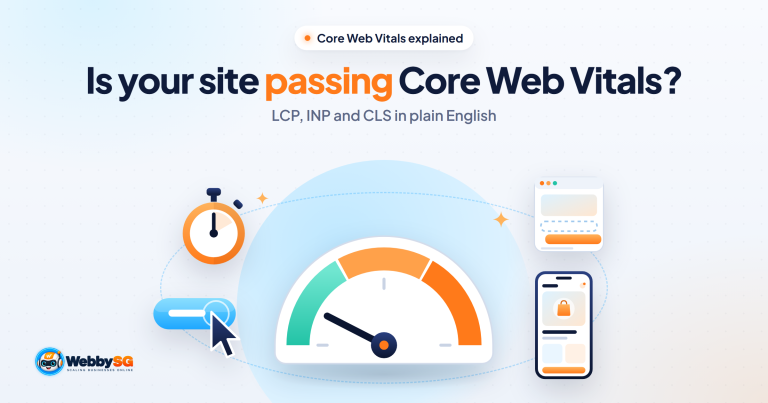
Google's Core Web Vitals give concrete targets for loading speed, responsiveness and visual stability:
| Metric | What it measures | "Good" threshold |
|---|---|---|
| Largest Contentful Paint (LCP) | How quickly the main content appears | 2.5 seconds or less |
| Interaction to Next Paint (INP) | How quickly the page responds to taps and clicks | 200 milliseconds or less |
| Cumulative Layout Shift (CLS) | How much the layout jumps while loading | 0.1 or less |
Google recommends assessing these at the 75th percentile of page loads, separately for mobile and desktop (web.dev). You can check your own site free with PageSpeed Insights or the Core Web Vitals report in Google Search Console.
Many speed problems start as design decisions: full-screen autoplay video, large uncompressed images, image sliders and heavy animation. A good designer weighs each one against what it adds for the visitor.
About the "3-second rule". You will often read that visitors leave if a site takes more than three seconds to load. The figure traces back to Google research from 2016, which reported that 53% of mobile site visits were abandoned when pages took longer than three seconds to load. The research is now dated and the number is not a formal rule, but the principle holds: slower pages lose visitors. Core Web Vitals are the more precise, current target.
4. Text is readable and the site is accessible
The international standard for web accessibility is the Web Content Accessibility Guidelines (WCAG) 2.2, published by the W3C. At Level AA, normal-sized text needs a contrast ratio of at least 4.5:1 against its background, and large text at least 3:1.
Accessible design helps everyone, not only people with disabilities. A customer reading your site on a phone in bright sunlight benefits from the same contrast and font-size choices as someone with low vision. Basic steps include:
- Sufficient contrast between text and background
- Link text that says where it goes ("See our pricing", not "Click here")
- Alt text on meaningful images
- Visible labels on every form field
- A site that can be navigated with a keyboard
5. Every page has one obvious next step
Each page should have a primary action that matches where the visitor is in their decision. A service page might lead to "WhatsApp us for a quote", a pricing page to "Book a call", and a product page to "Add to cart". Several competing buttons of equal weight, such as "Learn more", "Our story", "Subscribe" and "Contact", dilute the one that matters.
6. Trust signals are real and specific
People form a view of a site's visual appeal very quickly. A 2006 study by Lindgaard and colleagues, published in Behaviour & Information Technology, found that ratings of web pages made after 50 milliseconds of exposure closely matched ratings made after 500 milliseconds. Design creates that first impression, but evidence confirms or undoes it. Useful trust signals for a Singapore business include:
- A physical address and a working phone number
- Your registered company name and UEN
- Photos of your actual team, premises or work instead of stock images
- Reviews visitors can verify, such as Google or Carousell reviews
- Named client projects, ideally with results you can substantiate
Leave out claims you cannot support, such as "No. 1 in Singapore", or award badges without a source.
Singapore-specific considerations
Most global web design guides skip the following points. For a Singapore business, they matter.
Personal data on forms (PDPA)
A contact form that collects names, phone numbers or email addresses is collecting personal data under the Personal Data Protection Act (PDPA). Organisations must tell people the purposes for collecting their data and obtain consent for those purposes. They must also appoint a Data Protection Officer and make that officer's business contact information available, which can be published on your own website or through BizFile+. The PDPC sets out these duties on its Data Protection Obligations page.
In design terms, that usually means:
- A short notice next to each form explaining how the details will be used
- A link to your privacy policy
- A separate, unticked opt-in if you plan to send marketing messages
This is general information, not legal advice. Check the PDPC's guidance for your situation.
WhatsApp and click-to-call
Many Singapore customers would rather message a business than fill in a form. A WhatsApp button and a tap-to-call number are common expectations in sectors from renovation to tuition. Treat them as primary actions on mobile, and track clicks on them in your analytics so you know which pages produce enquiries.
Local search visibility
For businesses that serve customers in particular areas, the website and the Google Business Profile work together. Keep your business name, address and phone number consistent across both, and give each distinct service its own page instead of listing everything on one. Our local SEO guide for Singapore explains this in more detail.
Domain and hosting
A .sg or .com.sg domain signals a local business. Register it in your company's name, not your designer's, and do the same for hosting. Our guide to web hosting in Singapore explains what to check.
Multilingual content
If many of your customers prefer Chinese, Malay or Tamil, plan multilingual pages at the design stage. Adding a translation plugin after launch tends to produce awkward layouts and menus that remain in English.
Payments for online stores
If you sell online, decide early which payment methods your customers expect, such as cards and PayNow, and design the checkout around them. Our e-commerce website service covers the platforms we build on.
Grants: PSG has been replaced by EDGE
Many web design pages in Singapore still mention the Productivity Solutions Grant (PSG). Enterprise Singapore states that the PSG, the Enterprise Development Grant (EDG) and the Market Readiness Assistance (MRA) grant ceased on 29 September 2026, and that applications from 30 September 2026 are made under the EDGE Grant. EDGE offers up to 70% support for SMEs and up to 50% for non-SMEs, depending on the activity, with total support capped at S$100,000 per year.
Whether a particular website project qualifies depends on the activity, so check the EDGE Grant page or the Business Grants Portal before you assume a subsidy.
GST on quotes
If your web designer is GST-registered, quotes may be shown with or without GST, which has been 9% since 1 January 2024. Confirm which before you compare quotes.
The web design process, step by step
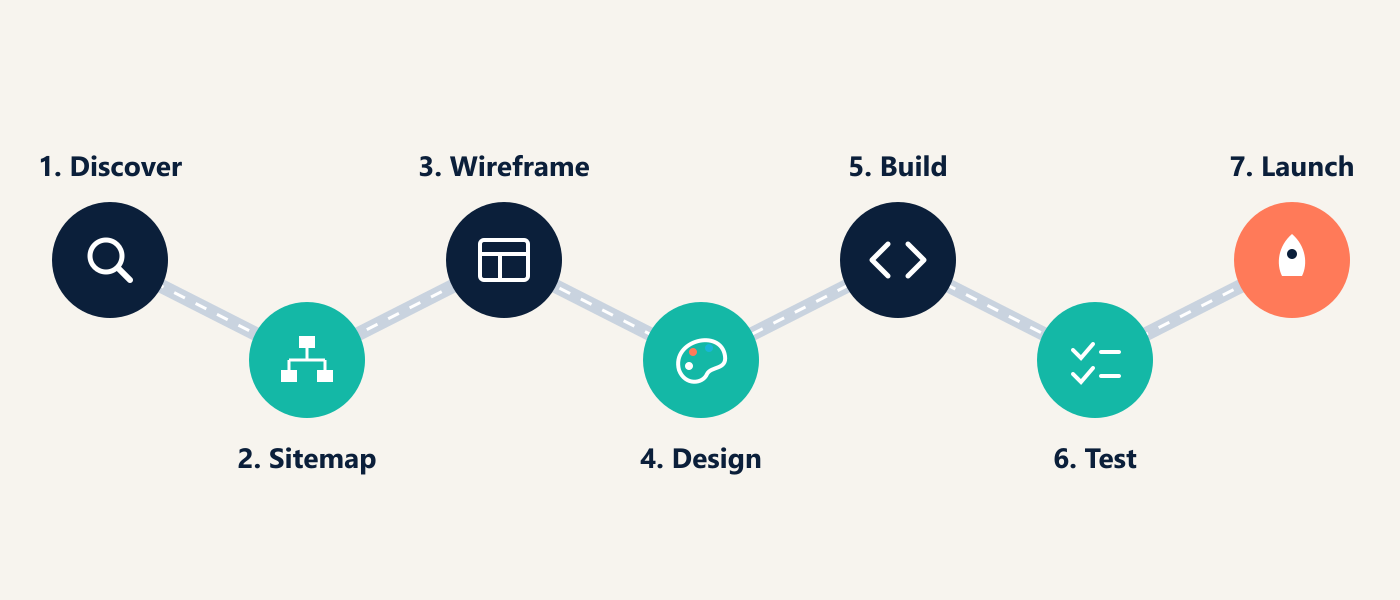
There is no official number of web design phases. Some providers describe five, others seven or more. Most professional projects move through the same stages, whatever they are called:
| Stage | What happens | What you need to provide |
|---|---|---|
| 1. Discovery | Agree goals, audience, competitors, scope and budget | Your business goals, sites you like and dislike, who signs off |
| 2. Sitemap and content plan | List the pages and what each must say | Service details, prices if published, questions your staff answer every day |
| 3. Wireframes | Plain layouts that show structure without visual styling | Feedback on order and priorities, not colours |
| 4. Visual design | Apply brand colours, typography and imagery | Logo files, brand guidelines, real photos |
| 5. Build | Develop the site on the chosen platform | Final copy, product data, access to your domain |
| 6. Testing | Check phones, browsers, forms, speed and accessibility | Test the enquiry flow yourself, on your own phone |
| 7. Launch and handover | Go live, set up analytics and Google Search Console, hand over logins | Confirm every account is in your company's name |
After launch, a site needs ongoing care: software updates, security, backups and content changes. Budget for it from the start; see website maintenance.
If you are redesigning an existing site, add two tasks before design begins: an audit of what currently works (pages that rank and pages that bring enquiries), and a redirect plan so old URLs point to their new equivalents. Skipping redirects is a common way for a redesign to lose search traffic. Our corporate website redesign guide covers this, and our list of essential corporate website pages helps with the sitemap.
How much does web design cost in Singapore?
There is no standard market price, and published figures from Singapore providers vary widely because they cover different scopes. As one reference point, Webby SG's published web design packages start at S$600 for a one-page landing page, S$1,200 for a 5–7 page site and S$1,500 for 7–10 pages with a custom function such as booking or a calculator. Larger custom builds, online stores with large catalogues and web applications are priced on scope and can cost several times more.
What drives the price:
- Number of unique page layouts, not just the number of pages
- Custom design or an adapted template
- Copywriting and photography, and who provides them
- Functions such as booking, calculators, member areas, multiple languages or e-commerce
- Integrations with payment, CRM, inventory or accounting systems
- Content migration from an existing site
- Running costs: hosting, domain renewal, maintenance and software licences
When comparing quotes, the three questions that most often separate a cheap quote from a good one are: what triggers extra charges, what hosting and maintenance cost after the first year, and whether the domain, hosting and website will be in your company's name. For the full buyer's checklist, see how to choose web design services in Singapore.
DIY, freelancer or agency?
A DIY website builder can suit a very small business with simple needs and time to spare. A freelancer suits a well-defined project where you already know what you need. An agency suits businesses that want design, build, content and marketing handled together. Our comparison of agencies, freelancers and templates covers the trade-offs in detail.
Common web design mistakes
- Designing the desktop version first and treating mobile as an afterthought.
- A homepage headline about the company's values instead of what it sells.
- Hiding prices, location or contact details that customers need in order to decide.
- Using stock photography where real photos are possible.
- Autoplay video and large sliders that slow the page and push the message below the fold.
- Long forms with fields nobody uses.
- Launching without analytics or conversion tracking, so no one can tell which pages produce enquiries.
- Letting a designer register the domain or hosting in their own name.
- Redesigning without redirecting old URLs.
If your current site looks fine but brings in few enquiries, read why a website fails to generate leads or our website UX audit guide.
Common questions about web design
What are the golden rules of web design?
There is no official list. Many versions draw on Ben Shneiderman's Eight Golden Rules of Interface Design, which include striving for consistency, offering informative feedback, preventing errors, permitting easy reversal of actions and reducing short-term memory load. On a business website, these become consistent navigation, a clear confirmation when a form is sent, forms that catch mistakes before submission, and pages that do not make visitors remember details from elsewhere.
Where can I find web design inspiration?
Galleries such as Awwwards and Dribbble showcase visually ambitious work, though much of it is concept work rather than live business sites. More useful references are usually the strongest sites in your own industry, including overseas ones, and sites you personally find easy to buy from. Note what they do well, then adapt the idea for your customers instead of copying the look.
How long does it take to design a website?
It depends on scope and on how quickly content and feedback are ready. Webby SG's published timelines run from one to two weeks for a landing page to three weeks or more for a 7–10 page site with a custom function. Larger custom projects take longer. Late content is the most common cause of delay, so prepare copy and photos early.
Do I need to know coding to design a website?
Not for a basic site on platforms such as WordPress, Shopify or Wix. Coding knowledge matters for custom functions, performance tuning and integrations. Our web design tools guide covers the main tools.
Getting your website designed with Webby SG
Webby SG designs and builds websites for Singapore SMEs on WordPress, WooCommerce, Shopify and Wix. Pricing is published, proposals are fixed-price, and your domain, site and accounts stay in your company's name. You can browse client websites we have built and compare web design packages.
If you would like a second opinion on your current site or want to discuss a new one, get in touch on WhatsApp or by enquiry form.