
How to Read a Google Ads Report: 8 Key Metrics
Learn how to read a Google Ads report, assess eight essential metrics, avoid misleading conclusions and connect campaign spend to qualified leads.

Quick answer: A useful Google Ads report should tell you whether the campaign is producing qualified enquiries at an acceptable cost—not merely whether it generated clicks. Read it in this order: confirm the date range and conversion tracking, check conversions and cost per conversion, assess conversion quality, then use CTR, CPC, search terms and impression share to diagnose what is helping or hurting the result.
A Google Ads report can look reassuring while hiding the one fact a business owner needs to know: did the spend create real sales opportunities? A high click-through rate may still lead to poor enquiries. A low cost per click can be wasteful if the search terms are irrelevant. Even a large conversion total can mislead you when phone taps, page views and genuine leads are grouped together.
This guide explains eight Google Ads metrics in practical business terms. It is written for Singapore SME owners reviewing an in-house campaign or an agency report, without assuming you spend all day inside Google Ads.
The eight metrics at a glance
| Metric | What it answers | What can mislead you |
|---|---|---|
| Impressions | How often were your ads shown? | Visibility is not demand or revenue. |
| Clicks | How many visits did the ads generate? | Clicks can include poor-fit searchers. |
| Click-through rate (CTR) | Did the ad appear relevant enough to click? | A strong CTR can coexist with weak lead quality. |
| Average cost per click (CPC) | What did each click cost on average? | Cheap traffic is not automatically valuable traffic. |
| Conversions | How many tracked actions happened? | The total depends entirely on what is configured as a conversion. |
| Conversion rate | What share of interactions produced a conversion? | Bad tracking or mixed conversion actions distort it. |
| Cost per conversion | How much ad spend produced each tracked action? | It is not the same as cost per qualified lead or sale. |
| Conversion value / cost (ROAS) | How much tracked value came back for each dollar spent? | It is useful only when revenue or lead values are trustworthy. |
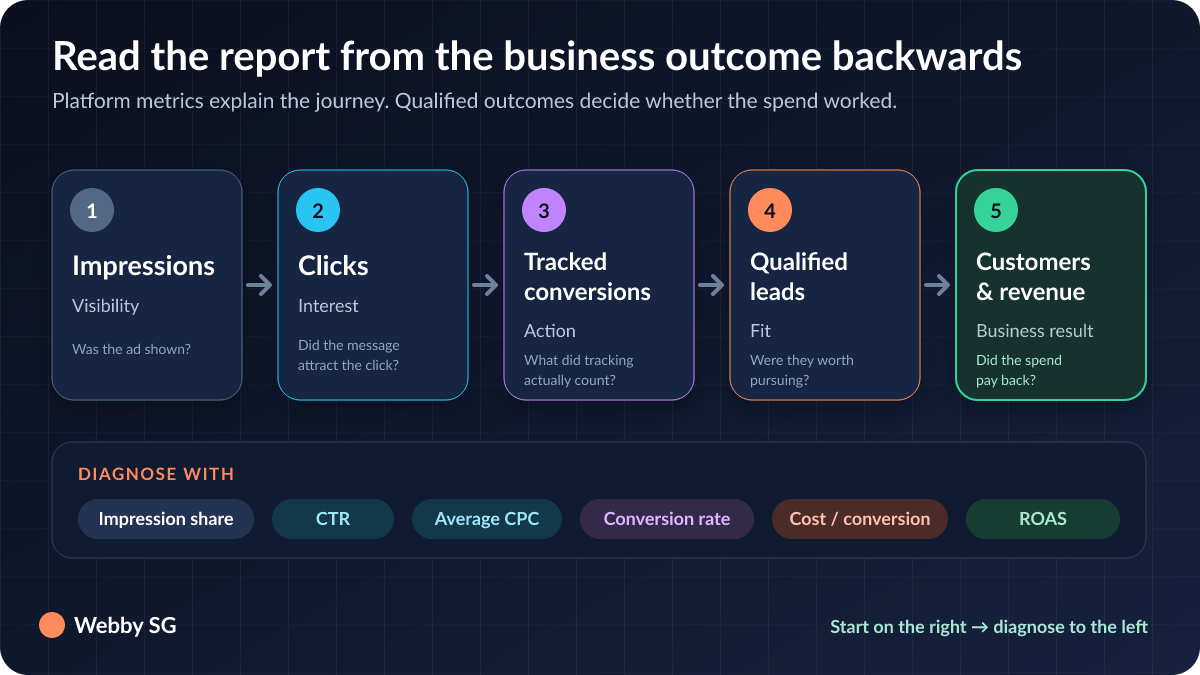
Before reading the numbers, check the report itself
Three checks prevent most reporting mistakes.
- Use a meaningful date range. Compare complete periods and account for seasonality, promotions, public holidays and changes to budget or landing pages. A seven-day snapshot may be too noisy for a lower-volume service business.
- Confirm what counts as a conversion. Ask for the conversion-action list. Form submissions, calls, WhatsApp clicks, purchases and booked appointments are business outcomes; a page view or button click may only be a micro-conversion.
- Separate campaign types and goals. Brand search, non-brand search, remarketing and shopping campaigns behave differently. A blended total can hide an inefficient campaign behind a strong one.
Google’s own reporting documentation defines the standard columns, while its conversion reporting guide explains metrics such as conversion rate, cost per conversion and conversion value. Keep those definitions as the baseline, then add the commercial context that matters to your company.
1. Impressions: visibility, not success
An impression is counted when an ad is shown. Rising impressions can mean more available searches, broader targeting, a higher budget or better eligibility in the auction. They do not prove that the campaign is attracting the right people.
Use impressions as a diagnostic metric. If qualified conversions are stable but impressions suddenly jump, inspect the search terms and targeting. If impressions fall, check whether the budget is constrained, demand changed, keywords lost eligibility or competitors became more aggressive.
2. Clicks: traffic that still needs qualifying
Clicks tell you how many visits the ads generated. They are useful for understanding volume, but a click is an expense before it becomes a business result.
Do not review clicks without the search-terms report. Keywords are what you target; search terms are what people actually typed. The difference is where irrelevant traffic often appears. A Singapore service business may discover clicks from job seekers, DIY researchers, students, overseas users or searches for a service it does not provide. Those findings should inform negative keywords, match types and location settings.
3. Click-through rate: a relevance clue, not a sales score
CTR is clicks divided by impressions. It helps indicate whether the message connects with the audience seeing it. A weak CTR can point to loose targeting, an uncompetitive offer or ad copy that does not match the query.
There is no universal “good CTR” for every Singapore business. Brand campaigns typically behave differently from non-brand campaigns, and a niche B2B service cannot be judged by the same benchmark as retail. Compare CTR by campaign, ad group and intent, and evaluate it alongside conversion quality.
4. Average CPC: the price of access to the auction
Average CPC is total click cost divided by clicks. It is shaped by competition, bidding, expected performance, query intent, location, device and other auction factors.
Lower is not always better. A high-intent search that costs more may produce a stronger sales opportunity than several cheap research clicks. The useful question is whether the CPC allows the campaign to acquire qualified leads profitably—not whether it is lower than an arbitrary benchmark.
5. Conversions: audit the definition before celebrating the total
A conversion is a tracked action that the account has been configured to count. That flexibility is helpful, but it is also why conversion totals can be misunderstood.
Ask your marketer to show each primary and secondary conversion action, its source and whether it is included in the main Conversions column. For a lead-generation campaign, primary actions might include submitted enquiry forms, calls that meet a duration threshold, WhatsApp conversations or confirmed bookings. Newsletter sign-ups and brochure downloads may be useful, but they should not silently carry the same weight as a sales enquiry.
6. Conversion rate: landing-page and traffic quality together
Conversion rate is conversions divided by eligible ad interactions. It reflects more than ad performance. It is affected by the searcher’s intent, the offer, the landing page, mobile usability, form friction, page speed and tracking setup.
If CTR is healthy but conversion rate falls, inspect the journey after the click. Does the landing page continue the promise made in the ad? Is the service area clear? Can a mobile visitor call or submit the form easily? Is the campaign sending broad informational searches to a page designed for ready-to-buy customers?
7. Cost per conversion: useful, but not yet cost per customer
Cost per conversion is campaign cost divided by conversions. It is often the headline metric in an agency report because it links spend to tracked outcomes. Treat it as a starting point.
For lead generation, add two business layers: the percentage of conversions that become qualified leads, and the percentage of qualified leads that become customers. If one campaign reports a lower cost per conversion but delivers mostly poor-fit enquiries, it may be less efficient than a campaign with fewer, better leads.
8. Conversion value / cost: only as reliable as the values entered
Conversion value divided by cost is the Google Ads column commonly used to represent return on ad spend. Ecommerce businesses can import transaction revenue. Lead-generation businesses may import offline sales or assign values to different lead types.
Do not treat estimated lead values as realised revenue. Ask whether the account uses actual purchase values, closed-sale data or assumptions. If the values are assumptions, the report should label them clearly. Connecting advertising data to CRM outcomes gives a much stronger view than assigning the same value to every form submission.
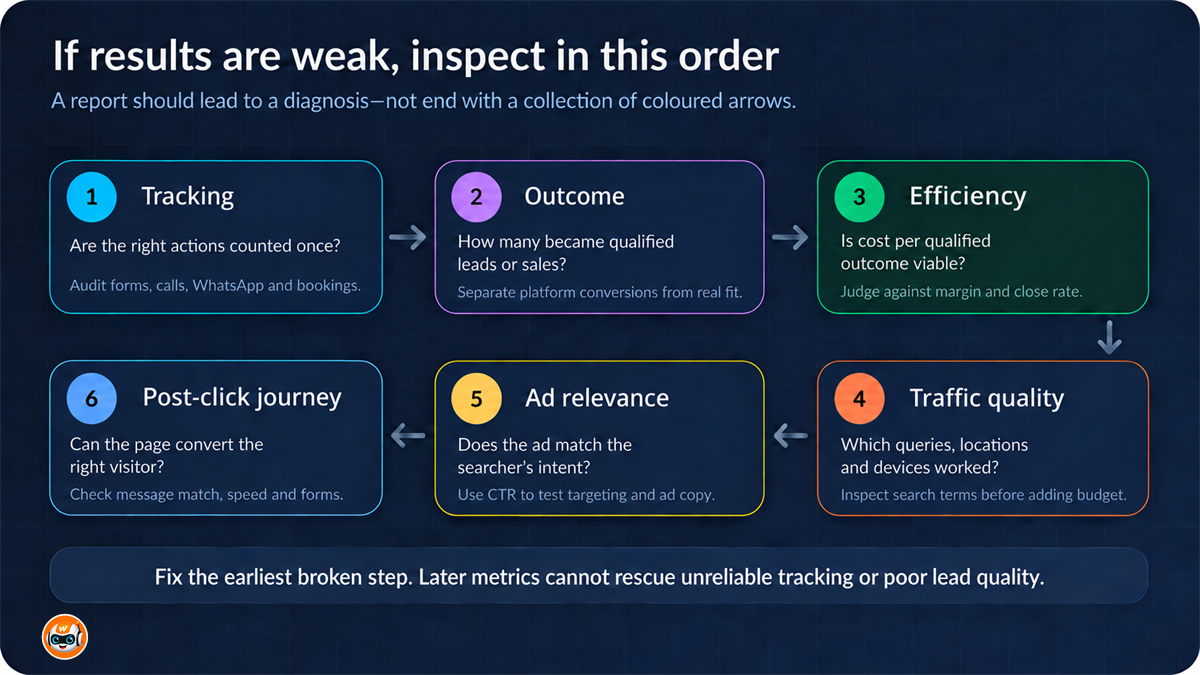
A practical way to diagnose a campaign
Read the report as a sequence rather than eight isolated scores:
- Tracking: Are the correct business actions counted once and attributed sensibly?
- Outcome: How many qualified enquiries, sales or bookings came from the spend?
- Efficiency: What was the cost per qualified outcome, and is it commercially viable?
- Traffic quality: Which search terms, locations, devices and times produced those outcomes?
- Ad relevance: Do impressions, CTR and ad-message performance reveal a targeting or messaging problem?
- Post-click experience: Does conversion rate point to friction on the landing page or offer?
Example: when a better CTR produces worse business results
Imagine a home-services company running two non-brand search campaigns. Campaign A has the higher CTR and the cheaper CPC, so it looks stronger at first glance. Its search terms, however, include many “how to” and low-intent queries. The conversion total includes phone-button taps, and only a small share becomes a booked site visit.
Campaign B has fewer clicks and a higher CPC. Its queries contain urgent service intent, its conversions are completed forms and connected calls, and a larger share becomes a qualified booking. Campaign B may be the better commercial campaign even though its top-of-funnel metrics look less attractive.
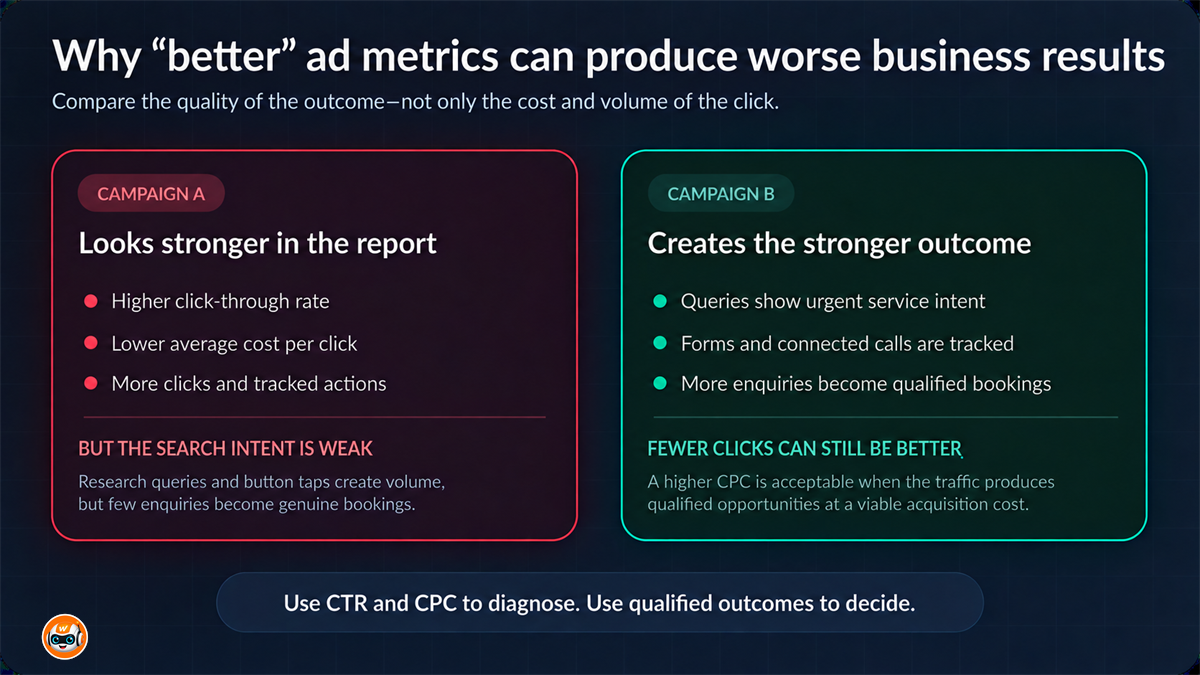
The lesson is not to ignore CTR or CPC. It is to use them to explain the business outcome, never to replace it.
Questions every SME owner should ask about the monthly report
- Which conversion actions are included in the headline total?
- How many conversions became qualified leads, bookings or sales?
- Which search terms spent money without producing a useful outcome?
- What changed during the month, and what evidence supports that change?
- Are brand and non-brand results reported separately?
- Is any campaign limited by budget, and would more budget likely be profitable?
- What will be tested next month, and what result would count as success?
A transparent report should make these answers easy to find. If you want reporting tied to calls, forms, WhatsApp enquiries and commercial outcomes, see Webby SG’s Google Ads management service. For broader campaign planning, read our Google Ads guide for Singapore SMEs.
Frequently asked questions
What is the most important metric in a Google Ads report?
For most lead-generation campaigns, start with qualified conversions and cost per qualified conversion. The standard Google Ads conversion total is useful only after you confirm which actions it includes.
Is a high click-through rate always good?
No. A high CTR suggests the ad attracts clicks from the audience seeing it, but it does not prove those clicks become qualified enquiries or sales. Check search terms, conversion quality and cost per outcome.
Why do Google Ads conversions not match sales?
Google Ads records configured conversion actions, which may include leads or smaller interactions rather than completed sales. Attribution settings, reporting delays, consent and missing offline-sale imports can also create differences.
How often should an SME review Google Ads performance?
Monitor tracking and spend regularly enough to catch problems, but judge performance over a period with enough data for the business. Monthly reporting is common; active campaign management should happen more frequently than the client report.
Should a report include search terms?
Yes. Search terms help show whether the account is paying for relevant intent and reveal opportunities for negative keywords, tighter match types and new ad groups.
Definitions referenced: Google Ads statistics-table columns and Google Ads conversion reporting.